More...
Hi! My name is Oren Shalmy.
This blog is a collection of articles discussing various technologies used in video and film post production. Some posts are original, most are not.
From open source tools and rebel techniques to high-end DI, digital distribution, animation and VFX.
Friday, June 24, 2011
The Clip's Master Clip Is Not Present - Error
More...
Workflow: Adobe Premiere Intro and FCP 7 roundtrip
I’ve been a Final Cut Pro user for more than 6 years, well before I started to shoot video (I used it for photo slide shows when I was at The New York Times.) I started to test out the waters with Adobe’s CS5.5 Production Suite a few months ago as it supported HDSLR footage natively (Adobe’s Mercury engine doesn’t need to convert the footage in order to edit it, and that can speed things up significantly during an edit or when you’re on deadline.) I also needed to familiarize myself with software that others could use on both a Mac and PC (which CS 5.5 does – in fact you can transfer your projects back and forth seemlessly between both platforms on the same HD/USB stick in case you were curious.)
More...
Thursday, June 23, 2011
Element: 3D particle plug-in announced
Andrew Kramer shared some details about a new Video Copilot plug-in called Element (formerly Atom), a “3D geometry-based” particle system with array and material features integrated into AE 3D. Element was demoed at MGLA, with a demonstration planned soon for Video Copilot.
More...
Wednesday, June 22, 2011
X-Rite announces New Display and Projector Color Calibration Solutions
X-Rite announces New Display and Projector Color Calibration Solutions:
X-Rite announces the immediate availability of i1Display Pro and ColorMunki Display, two all-new technologically advanced hardware and software solutions for color calibration and profiling of displays, laptops and projectors.
More...
Final Cut Pro X – Day Two
So after messing around for a couple more hours this is my conclusion:
Cons:
- No support for external monitoring. My BlackMagic card is just sitting around.
- No plug-ins support (yet)
- No backward compatibility with older versions of FCP
- No support for EDL, OMF or XML
- They dropped makers (WHY?!)
- No customization of the workspace (or very limited)
- No or limited import and no output from and to tape, which I kind of understand as it will slowly disappear, but I think it’s too soon.
- Still a lot of bugs (expected in a 1.0 release)
- When ‘background’ analyzing media, my 8 core hyperthreading 16GB DDR3 Mac Pro goes really slow.
- A lot of the standard effect presets are really cheesy and straight out of iMovie or Motion 4.
- The magnetic timeline works amazing.
- The new user interface looks fantastic
- Skimming trough clips works naturally
- The new events browser really makes it easier to see what a clip contains, thus makes you edit faster.
- The iMovie way of setting in and out points is really quite nice.
- Instant previews of effects
- The new color grading tool is great and easy to use and can do advanced stuff such as masks.
Light Illusion Develops Colour Workflow with Imagezone
Imagezone video assist service in New Zealand has acquired new image management tools from
Light Illusion to match their requirements for on-set colour management and look control for dailies
and editorial.
More...
Color Subsampling, or What is 4:4:4 or 4:2:2??
In the video space, there’s always a lot of talk about these number ratios – 4:4:4, or 4:2:2, or 4:1:1, but what exactly do they mean? Recently, someone argued with me that it was better to convert every video clip from my Canon Rebel T2i DSLR camera into a 4:4:4 intermediate codec before editing; that this would make the color magically “better” and that editing natively was somehow bad. They were wrong, and I’m going to explain why.
More...
FCPX-”Everything just changed in post” but NOT for the better !
Bye bye Color, what now?
Yesterdays release of FCPx caused a lot of disappointment in the industry. The fact that Color is gone might be biggest one for us colorists. Apple has included some basic grading tools that are better then 3-Way Color Corrector, but to call it a grading tool is just not correct.
More...
X פיינל קאט
Final Cut Pro X - The Good, The Bad and The Ugly - Digital Rebellion Blog
Final Cut Pro X - A first Look
Final Cut Pro X - add-ons, graphics card requirements and supported cameras!
Eizo industrial monitor does 4K resolution at 36-inches, start saving now
Looking for a display that can do justice to all that 4K footage you've been shooting on your Red One or Arri Alexa lately? Okay, perhaps not. But if you were, then the DuraVision FDH3601 from Eizo Nanao could handle it easily with 4096 x 2160 pixels spread over 36.4-inches of LED-backlit real estate.
Tuesday, June 21, 2011
Final Cut Pro X Supported Cameras
Final Cut Pro X is designed to work with a wide range of video recording devices, including camcorders, digital still cameras, iPhone, iPad, and iPod. To simplify the process of selecting compatible devices, Apple has tested popular models.
More...
Red Epic HDRx Test Examples
The last week has been a whirlwind of testing Red's new 5K Epic digital cinema camera, special thanks to Blair Paulsen for lending us his camera, one of the first Epics available. Beyond its high resolution beautiful sensor, the new kid in town is called "HDRx," and is a creative take on something that digital cameras have lacked for awhile: High Dynamic Range.
More...
A Third Way to Make Titles
Additional Codecs in Final Cut Pro X
Be sure to download the additional content in your software update right after you get the download of Final Cut Pro X or Compressor from the App Store.
More...
What other New Features does Final Cut Pro X have?
When Apple teased us with a Sneak Peek we knew that there had to be more to Final Cut Pro X than they showed. There certainly is and these features are great. Here’s the run down of the key new features that were not seen during the Sneak Peek, but deserve to be known.
More...
What are the Answers to the Unanswered Questions about Final Cut Pro X?
Since Apple’s Sneak Peek of Final Cut Pro X, the questions have been flying around the Internet. Well, here’s concise answers to those questions – as many as I could find, so settle in and learn what’s new and what’s not there yet.
More...
What other New Features does Final Cut Pro X have? | The present and future of post production business and technology
Final Cut X is Here
"
Motion 5: Top 5 New Features
The new Motion 5 has arrived - and here’s the funny thing: while it looks radically different, contains features that represent a completely new paradigm, and will change the way motion graphics are created - it is at the same time no different at all. How can that be? Read on for summary of what I consider the 5 biggest changes in Motion 5, and why they change everything - and nothing at all.
More...
Monday, June 20, 2011
(יסודות בתלת מימד (סטראוסקופי
Autodesk Smoke - watch The Avid AAF conforming workflow in action!
More...
סמוק נהפכה למכונת קונפורמינג משומנת ויעילה. עכשיו כשיש גרסאת מק זולה יחסית, 20,000 דולר, היא הופכת להיות יותר רלוונטית ומתאימה במיוחד לסטודיואים מבוססי מוצרי אוטודסק כגון פליים ולאסטר.
סמוק תמיד הייתה בעייתית בפונקיה שלה. היא לא באמת מערכת עריכה, לא ממש מכונת אפקטים, לא בדיוק קולור קורקשן... איפה שהוא בין לבין לבין. עכשיו היא כשהיא מבשילה לאט לאט והמחיר ירד, היא נהפכת לאולר השוויצרי של בית הפוסט, אם בית הפוסט מבוסס על מוצרי אוטודסק.
Post Soup Part 1: The Ingredients of Post Soup
Anatomy of an Edit Suite
למרות שלא הייתי משתמש בדיוק באותו ציוד או עיצוב, המאמר הזה מאד מפורט ואפשר ללמוד הרבה מהנמוקים שלו לגבי בחירת המרכיבים. אמנם התרשים הזה מתאר סטדויו שנותן שירותים למגוון רחב של הפקות, אך תמיד חשוב לשאול בבניית חדר עריכה (או כל פונקציה אחרת) את האשלות הבאות:
Light Illusion - Matchlight
Light Illusion provided New Zealand based Imagezone with a full range of color management tools, from display calibration and 3D LUT management via LightSpace CMS, to image look control for dailies and editorial through the use of Alexicc and SpaceMan ICC, as well as look cloning and conversion with MatchLight IMS .
More...
Sunday, June 19, 2011
The Great Camera Shootout 2011: SCCE ~ Episode One | Zacuto USA
In the most scientific camera comparison to date, “The Great Camera Shootout 2011: a documentary of the Single Chip Camera Evaluation (SCCE)” premieres with Episode 1: “The Tipping Point.” The first episode of the 3-part web series examines three SCCE Tests: The Dynamic Range Test, The Under Exposure Test and The Over Exposure Test. More...
The Freesound Project
June 17, 2011
by Freesound.org
The Freesound Project is a collaborative database of Creative Commons licensed sounds. Freesound focusses only on sound, not songs. This is what sets freesound apart from other splendid libraries like ccMixter.
More...
Sony SRCodec native support
Sony has released plugins to use the Sony SRCodec natively in FCP v7 and AVID MediaComposer 5.5. DaVinci Resolve and Filmlight won't need any plugin since they have implemented the codec natively into their architecture. There is also a standalone viewer for Windows.
More...
Sony NEX-FS100: Dynamic Range Test
A couple of weeks ago we tested a pre-production model of the Sony FS100 camera for both ISO ratings and dynamic range. We came up with some impressive results, but decided to do some more tests with the full production version of the camera. The ISO ratings stayed the same but I found that the production version of the camera actually had improved dynamic range overall. In my video above, I show the results of my tests at the four different gamma modes of the camera.
More...
Thursday, June 16, 2011
Pro Media Tools 1.0.2 released - lots of new Auto Transfer features
Last week we released Pro Media Tools 1.0.2, a significant update to our suite of tools for processing and managing media in Final Cut Studio, Avid Media Composer and Adobe Premiere Pro.
The focus of this version was Auto Transfer and lots of new features have been added.
More...
Wednesday, June 15, 2011
Free Stereo Footage from Artbeats, and an After Effects tutorial showing how to use it in CS5.5
Here’s a 7 minute tutorial to get you started incorporating 3D graphics and 3D footage using the stereo 3D pipeline in After Effects CS5.5. To learn more, look for the CS5.5 electronic update available to readers/owners of my book, After Effects Studio Techniques CS5, which will be available sometime this month (details to follow).
More...
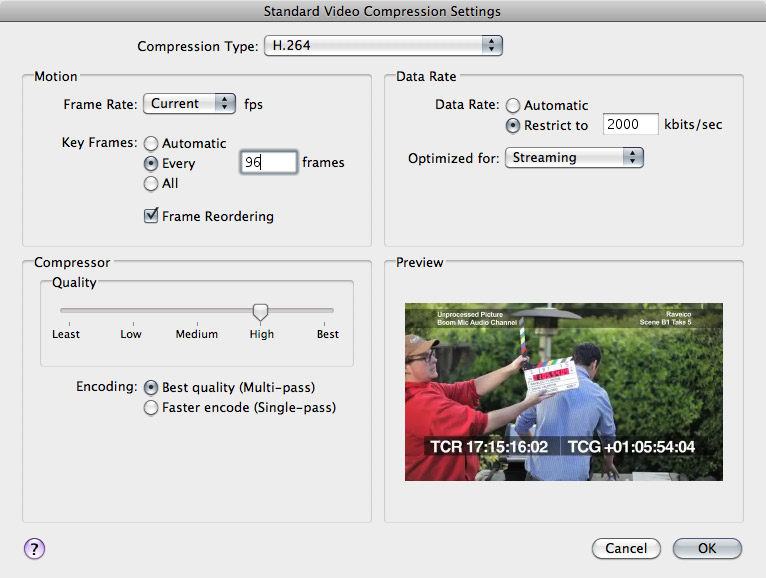
Tuesday Tip #3 – Compression: Keyframes are your Friends
To those that are new to video compression and encoding, there may be a setting you might not know about, or are unfamiliar with if you have seen it. It’s the “keyframe” setting in many video encoding applications.
A video compression keyframe has nothing to do with an animation keyframe, so let’s get that out of the way first. When encoding video for the web, or anything that needs small files while maintaining decent visual quality, keyframes can be your secret weapon. Think of video compression keyframes as your reference frames to which all successive frames will be based on. This way, those successive frames don’t need to “recreate” the entire frame of visual data, only what has changed from the keyframe.
Chromagic FX Plug & Chromagic Ipad App for color correction in Final Cut Pro 7!
Chromagic is an FX-Plug for Final Cut Pro 7 for color correcting your clips. The plug-in works with the Chromagic Ipad App which you need to install on your device in order to turn it into an "eyes-free" color correction console.
This is getting serious. As I recall this is the second app of this sort, and there are probably more to come. This is true democratization the color grading process.
AF100: Scene Files, Lens Files & Firmware
Firmware updates are available from Panasonic’s website. As of this posting, the current firmware version is V1.15.
More...
?מה זה אומר לתעשיית הפוסט SAN? NAS?
יש דרכים לשלב מהירות של SAN וגמישות של NAS. פתרונות אלו מורכבים להתקנה, עולים לא מעט ודורשים תמיכה מקצועית. הם בנויים של שילוב קפדני של רכיבי חומרה ותוכנה והגדרות דקדקניות ספציפיות לכל קונפיגורציה.
חשוב להבין טוב את הצרכים לפני שבוחרים מערכת אחסון. ישנם הרבה משתנים שיקבעו לבסוף מה המערכת האופטמילת לכל סוג של עבודה, איפה אפשר לחסוך ואיפה חייבים ללכת "לפי הספר".
Tuesday, June 14, 2011
Web Video Chaos Intensifies Despite Progress on Standards
SONY Announce More Details On Their F65 8K Sensor Camera
More...
Here's Every 3D Movie Ever Made [Image Cache]
Some day in the not-so-distant future, there's going to be a bizarro Criterion Collection that goes about destroying the very worst that Hollywood has provided us. They'd be wise to start with this (gigundo) graphic that lays out every single 3D movie ever. BURN IT. BURN IT ALL.
More...
Monday, June 13, 2011
?LUT מה זה
מה הכוונה טרנספורמציה של צבע?
- LUT לצפייה, כשמה היא, מיועדת לצפייה בחומרים בקולור ספייס (או גמא או צפיפות) שונה מזה של המכשיר שעליו הם נצפים.
- LUT לקליברציה משמשת כדי לדמות את הקולור ספייס של מדיום היעד (פילם, מקרן דיגיטאלי) על גבי מכשיר מכוייל בעל קולור ספייס שונה (פלזמה, CRT...).
- LUT להמרה משמשת כדי להמיר מקולור ספייס או קידוד גמא אחת לשני, באופן דומה ל LUT צפייה. הLUT נצרבת (מרונדרת) על גבי קובץ כדי להקנות לו את הצבעוניות הנכונה.
השימוש ב LUT בדרך כלל מתלווה לטכניקות ניהול צבע אחרות ולרוב מתחבר לתעשיית הקולנוע. בשנים האחרונות, או מאז פריצתה של מצלמת RED השימוש בLUT נהיה פופולארי יותר ונכנס לאט לאט גם לתחום הטלוויזיה.
Friday, June 10, 2011
HD Formats: Color Model & Color Sub-Sampling
Thursday, June 9, 2011
The death of DSLRs
Its ironic really; 2010 had been "the year of DSLRs" at NAB, but this year everyone agreed that their moment had passed. Attention moved to the large sensor video cameras; from the expensive RED's and Alexa's, to the more price conscious Sony PMW-F3, Sony NEX-FS100, and Panasonic AG-AF100.
Not"
SpectSoft Releases Free Rave Software
More...
Q&A: Small Tree's Steve Modica on Storage Protocols
More...
Pinwire.com » Download Canon Software!
Ultimate shootout - comparison of six digital/film motion picture cameras!
- Aaton 35-3
- Arri Alexa
- Red MX
- EOS 1DmkIV
- Sony PMW F3 (was an engineering sample)
- Aaton XTR PROD (Super 16)
Here is what John wrote on the test shoot:
"
Tangent vWave-Lite - review
Today I got my hands on an iPad and I remembered that Tangent has a product called vWave-Lite. It's an iPad app that has 3 virtual trackballs and rings to control Apple Color. The app is free and it connects via WIFI to the mac that has to run the Tangent Color Support Package which can be downloaded for free from Tangent.
"
RED Epic – 5K and HDRx
Here is a quick video of some of my initial camera test with the RED Epic – serial number 308. We spent a little over a week driving around California thanks to Eric Kessler who sponsored our little project and shot a lot of behind the scenes footage that we will be sharing with you over the next few weeks on this blog.
We initially ran into 4 days of very bad weather (rain and high winds) and it took me a little while to configure the camera in terms of handles, rods etc as well as to get to get to know it and the workflow that followed. The good news is that we’ll be sharing many of those lessons with you (most of them will apply directly to HDDSLRs by the way!) We’ll be covering a variety of the gear we used as well as time lapse techniques (that were shot with the Canon 5D MKII and 1D MKIV.) After the video I’ll discuss two of the most impressive features of the RED Epic – the incredible 5K resolution, as well as their HDRx technology.
More...
Tuesday, June 7, 2011
P+S Technik PS-Cam X35 Extends HD Frame Rates to 450fps
digital camera to handle a variety of speeds suitable for commercials, documentary,
sport and television.
| According to P+S Technik, as digital film technology develops, new frame rate speeds are opening new options for storytelling. At 300fps to 450fps human action can add a different look to sports, documentary, wildlife and feature films. The PS-Cam X35 can film frame rates from between 1 and 450 fps. The PS-Cam X35 is also expected to combine aspects of sync-sound cameras and higher speed rates into one all-purpose digital camera. Dynamic Picture Quality Enhancement processing gives 11 T-stops at normal and high speed. The internal memory is 18 GB and allows recording of more than 4min in normal speed. A memory upgrade to 36 GB is planned. The switchable HD-SDI interface in 1.5 G and 3 G outputs to most HD-SDI recorders. Genlock and time code are included. It has a PS-IMS lens mount and CMOS 35 Digital sensor measuring 21.1 x 11.9 mm at full HD with 1920 x 1080 resolution. It records HD in 4:2:2 10 Bit uncompressed, and is stereo compatible. A RAW option is planned with 12 bit uncompressed recording. Its weight is approximately 9.5kg. Available accessories are a range of IMS lens mounts, standard batteries, a hand unit for remote control and the various HD-SDI recorders. A new electronic viewfinder is also planned. The PS-Cam X35 is expected to be released in the latter half of 2011. www.pstechnik.de |
|
Color Decision List - using EDL and CCC files
For this Tutorial I will be using Colorista Free from Red Giant Software together with Apple Final Cut Pro to create the CDL values and DaVinci Resolve from Black Magic Design to use as the final grade system.
This tutorial is for understanding the CDL format. Do NOT use this workflow in a production since Colorista Free can't save the CDL values to a file. It would take more time to write down all the settings then to regrade the footage if you have many shots.
"
The DSL not R
From the moment they came out, HD-capable DSLRs have intrigued shooters with their ability to deliver Hollywood-style selective focus on a micro-budget. But even as HDSLRs have gained adherents, shooters have pointed to a list of pictorial, practical and ergonomic shortcomings. To be fair, these issues are the result of taking an excellent platform carefully optimized for still photography and adapting it for moving pictures. Sony understands. We know DSLRs, we love DSLRs, and we make a growing family of Alpha HDSLRs along with a large-sensor Handycam camcorder with still camera roots: the NEX-VG10, which uses an APS-C size image sensor. But we also wanted to create a purpose-designed professional camcorder that would combine the key benefits of HDSLRs without the limitations. The result is the NEX-FS100U.
More...
Color Decision List - introduction
Have you ever wanted to move a primary grade from one system to another one. For example you are on set and do a basic grade on the footage using 'Iridas Speedgrade On Set' just to get a look for the Dailies, but when you get to the final grade you are using another grading system which can't read the Iridas project file. There is a solution for this, it's the Color Decision List.
More...
Xsan Built Into Lion
By: aaron
I'll post more info if available (outside of NDA of course).
What do you think of that 97% price drop?
Update: From the updated What's new in Lion page:
Built into LionMore...
The Xsan file system is built into OS X Lion, allowing any Mac with appropriate connectivity to access an Xsan volume.
Case insensitivity option
For improved performance and simplicity, you can now create case-insensitive Xsan volumes. These volumes act like traditional HFS+ volumes and do not distinguish between uppercase and lowercase characters in filenames.
New preference pane
A new Xsan pane in System Preferences makes it easier to manage, mount, and unmount Xsan volumes.
Industry-standard multipathing
Lion supports the Asymmetric Logical Unit Access (ALUA) standard for multipathing and failover. This allows Xsan to be used with a variety of Fibre Channel RAID storage arrays.
Ethernet SAN Primer
Ok, I got a bunch of emails today asking to explain exactly how an Ethernet SAN works. I’ve done a full article on this in the past, but here’s a quick primer on how it works.
1 – The SAN controller computer. In our case, a Mac Pro 12 Core machine with 32GB RAM.
2 – An Ethernet controller inside the SAN controller computer. In our case it’s a Small Tree Communications Card.
3 – A RAID Host controller inside the SAN controller computer. In our case it’s the Atto R680 SAS Host controller.
4 – A high speed ethernet switch. In our case, a Small Tree 24 port ethernet switch.
5 – A high speed media array. In our case, a brand spankin’ new Small Tree 48TB ST RAID II. 16 drive chassis with 3TB drives.
6 – Client computers connected to the ethernet switch via Cat 5 / 6 cable. Mac Pro, iMac, Mac Mini, Laptops, anything with an ethernet port.
So in a nutshell, the high speed RAID connects directly to the SAN Controller computer.
The SAN Controller computer connects to the Ethernet Switch.
The Client computers connect to the Ethernet Switch.
Set up the Network settings correctly on the SAN Controller Computer and all Client computers.
Set up the File Sharing correctly on the SAN Controller Computer and all the Client computers.
That’s it in a nutshell. Mount the SAN to each client and start working.
There is zero control software needed to run the SAN. Just set it up, tweak it and start editing. Of course I’m not going to get 500MB/s to each client workstation like you might with Fibre Channel, but we get well over 100MB/s to each workstation allowing us to cut and view Apple ProRes HD files all day long across 14 workstations simultaneously.
Here’s a diagram of what the system looks like in our shop. In our case, we’ve decided to keep one of the original 16TB Expansion chassis from our original SAN so we can use it as a direct connect to our Resolve system for RED / Alexa playback and to use as a “dump drive” for the big SAN when needed to clean up the RAID.
And of course if you have any more questions on how to set up and install one of these, you definitely want to call on the experts at Small Tree Communications.
Monday, June 6, 2011
Digital and 3D cinema market trends in Europe Q1 2011
Highlights:
- Total digital screens in Europe increased 19.6% to hit 12,106 in Q1 2011
- France becomes the first territory in Europe to exceed the 2,000 digital screen threshold
- France also registered the highest level of both net digital and 3D installations in Q1 2011
- Over one third of total screens in the UK are now 3D
- Spain is the most underserved for both digital and 3D screens of Europe?s top five markets
In this report:
- Over 12,000 d-screens now active in Europe
- Top five territories lead Q1 net digital installations
- 3D momentum rebounds slightly in Q1 2011
- France leading pace of 3D growth
- Over one third of UK screens are 3D
- Germany breaks 1,000 3D screen barrier
- CGR raises 3D screen stakes in France
- Top five circuits reach over 45% digital penetration in Italy
- Yelmo rapidly proceeding with digital roll-out
- RealD gains market share in Western Europe
- D-cinema deal round up
3D International announces 21.5-Inch autostereoscopic touchscreen display
More...
Capturing Video and Audio on the iPhone
At today's Boston Media Maker's, Adam Weiss talked about the iPhone app FiLMiC Pro (currently $1.99) which provides several advanced video capture features including 3 separate shooting modes, 4 selectable resolutions, variable frame rates, the ability to set separate focus and exposure points, and more.
Adam also talked about capturing audio, using cables from kV connection to connect
More...
Discover Final Cut Pro X with Larry Jordan!
9:30 AM: Larry Jordan Training Session #1
11:30 PM: LUNCH -- Lead Sponsor stage presentations
1:00 PM: Larry Jordan Training Session #2
2:45 PM: Break - More company conversations
3:30 PM: Larry Jordan Training Session #3
5:00 PM: Final conversations, questions, and answers
5:30 PM: End of day
Doors open: 8:30 AM
Seminar starts: 9:30 AM
You can also check out two videos with Larry (below).
In this Final Cut webinar preview, Larry Jordan says that, although we don’t yet know all the answers, Apple has provided a roadmap of where they are heading. So, he thought it would be useful to reflect on what Apple has told us so far so that we can begin to plan how and when to make the conversion to the new version when it become available.
In this micro Final Cut tutorial Larry answers the question, “Under the system setting/playback control tab, the frame offset confuses me sometimes. Help!”.
Source: http://videoproductionnews.com | http://larryjordan.biz
"
Photography Cheat Sheet Infographic… photojojo: Time to...
Photography Cheat Sheet Infographic…
photojojo:
Time to lay off the auto-setting!
Thanks for the handy Photography Cheat Sheet, Miguel!
Saturday, June 4, 2011
Arriraw at a glance
Arri is killing it these days. The Alexa has all but taken over commercial and episodic production. Why is that? Simple - Direct to Edit. ProRes 4444 is a fantastic compression scheme with ample color information for grading. Combine this with the extended dynamic range of Log C and you've got a winner. PL lenses, Super 35, a camera department friendly build, and beautifully rich video that doesn't need to rendered. Arri saw the writing on the wall and commercial production quickly agreed.
Is ProRes 4x4 (or simply ProRes RGB) the best option in terms of image quality? Certainly not but as it's been proven time again, it's good enough for broadcast. Because of this, more often than not, it's the flavor. Does it get boring? Oh yeah. But Arriraw is happening now and that's a little more interesting.
More...
Playing with Epic frames
As RED Digital Cinema moves beyond the RED One camera, post production folks will need to keep up with the changes in files mastered on these next-generation RED cameras. RED’s Epic camera is starting to make it into the production world in ever-increasing numbers, but to date, most NLEs on the market aren’t ready yet...
More...
Friday, June 3, 2011
Micron RealSSD P320h can read 3GBps, write 2GBps, impress millions of geeks per second
Speed may be a relative thing, but whatever you choose to compare Micron's new RealSSD P320h series to, you'll probably find them pretty competitive. Coming in 350GB and 700GB capacities, these PCI Express solid state drives can process data at a rate of 3GB per second and write it at a no less impressive 2GBps. If you're more interested in input / output operations per second, the P320h clocks in at 750,000 IOPS when running Linux or 650,000 with Windows Server as the OS. You don't need us to tell you that both numbers represent screaming-fast performance. Such mighty feats are achieved with the use of 34nm SLC NAND flash memory and Micron's own controller chip. Samples of the P320h are trickling out now and mass production is coming in the third quarter of 2011, and while no pricing info has been offered yet, it's safe to say you'll be needing your company CFO's blessing before making any P320h purchases. Video and full PR after the break.
More...
Digital Cinema Real-World Available Light Test
We geeks are pixel pushers, and we love charts and scientific testing of camera systems. It’s an essential part of understanding where the system breaks, and it informs your creative freedom on-set. That said, it is sometimes refreshing to see a comparative test from a common real-world shooting situation - working with available light. This is one such test, compliments of John Brawley. Watch below…
"
Maxx Digital ships new 10Gig Ethernet Final Share shared storage system
(June 2, 2011) In early 2011, Maxx Digital completed their part in the building of the new facility for Biscardi Creative in Buford, GA. As part of this new facility, Maxx Digital installed their Maxx Digital Final Share system, which is a gigabit Ethernet shared storage system based on Small Tree hardware, link aggregating 6 gigabit Ethernet ports together to get the required bandwidth to play back HD video on Biscardi Creative's various MAC editing systems. 'Unfortunately, after the move,' said Maxx Digital President Ron Amborn, 'due to the addition of lots of new workstations, Biscardi’s system was never stable, and they suffered drop frame errors whenever they would play out shows from their Final Cut Pro editing system. While we had installed over 80 of these identical systems in numerous facilities around the United States, all based on Small Tree Ethernet hardware, we knew how serious this was, as Biscardi Creative was unable to work properly with this equipment. We realized that all of our clients were starting to demand higher performance, more rendering, more client FCP system, and all were totally intolerant of any failure of their shared storage system. No one wanted to hear any excuses anymore. We knew that there had to be a better solution, that still did not cost as much as an expensive Fibre Channel solution.
More...
ראיון מצולם עם ג'יימס קמרון ומיכאל ביי על צילום תלת מימדי
How to overcome your fear of DIY Color Grading
Color Grading is too often regarded as an arcane, exclusive science not fit for mere mortals. But the digital age is slowly starting to reshape this mentality and allow for a clearer perspective through the haze of hyperbole. Which is a good thing because the tools for getting great color grading results have never been better, cheaper or more...
More...
The Cheapest Colorist Control Surface EVER!
(This is a guest post by Colorist Josh Petok)
A colorist once said using a mouse is like “drawing with a potato.” That was my motivation for buying a Magic Trackpad. When using DaVinci Resolve, Power Windows are one of the strongest tools in your arsenal. I found that using the Magic Trackpad gave me speed and efficiency, as well as taking up much less space. However, that was only the beginning.
I found a utility called BetterTouchTool which allows you to link keyboard shortcuts to gestures like: 3 finger swipe up, pinch out, four finger tap, and over 60 others. In this tip, I will show how to map your own gestures, as well as how I use them within DaVinci Resolve to make your grading faster and more streamlined.
Josh Petok is a Colorist who helps reality shows look their absolute best. From his beginnings on “The Surreal Life,” he strives to intensify drama or comedy while still keeping the presence and authenticity of reality tv. Completing work on his 47th show, Josh is continually learning and developing new methods for enhancing the shows that he works on. You can find Josh on his homepage, his blog The Current Cut, and – of course - Josh can be found on Twitter.
Related Posts (automatically generated)
- Speed Demon: Copy, Paste, Remove FCP Attributes Like A Pro
- Can You Customize the Tangent Wave for DaVinci Resolve?
- Baselight is Final Cut’s Newest Color Grading Plugin!
FTC Disclosure
Tao of Color has not received compensation, goods, or services from anything mentioned in this post or in the Video Tutorial. We hope, one day, this might change. Affiliate links are clearly marked, resulting in a commission on sales (which helps support TaoOfColor.com).
"
Walt Disney’s MultiPlane Camera (Filmed: Feb. 13, 1957)...
Walt Disney’s MultiPlane Camera (Filmed: Feb. 13, 1957) (by fireurgunz)
"Lens Distortion Grids (pdf) for download
ericalba:
48 inches by 96 inches PDF files. You can print these at Fedex/Kinko’s, laminate them etc. You can scale these if you want a bit of a margin for rigging/mounting.
More...
base lens distortion grid
base lens disortion grid with nested smaller grid
base grid, nested smaller grid and xo
New PDF: Archiving for Indies

We just published a new PDF on archiving data:
“Archiving for Indies: Creating Long-Term Archives for Independent Digital Cinema”
Learn about the latest solutions in digital archiving using LTO-5 tape. Also–learn what NOT to use for your permanent data storage needs.
Document published June 2010 by Silverado.
Click to access PDF
"
Thursday, June 2, 2011
How I Stopped Worrying and Learned to Love Grade-Linking
Here’s one for my Resolve-using brethren. I’ve been trying for some time to come to terms with Resolve’s wonderful, yet at times terrifying auto-linking feature. I’m talking specifically about the fact that, when you first conform an EDL to a Media Pool full of files, any session’s clips that are linked to the same Media Pool file are automatically linked together in the Timeline, such that changes to one clip are automatically rippled to the other linked clips.
It’s all fun and games if you’re grading well-managed media, with strictly delineated coverage and no lighting changes in the middle of an angle (or, ugh, a take). For well-shot, well-organized projects, auto-linking is a GIGANTIC time-saver, and I love me some saved time.
However, if you’re editing documentary footage, or working on a project where multiple angles of coverage are combined into mixed content files that defy logic, then this mechanism can be more trouble then it’s worth. I’ve talked to more then one colorist who, upon conforming any EDL, immediately uses the Batch Unlink command to force all clips in a session to use Local grades, which are never linked among clips. In this way, its possible to work strictly clip by clip, linking only via manually created groups of your own choosing.
Another approach that I’ve used is to continue using the auto-linked Remote grades, creating new Versions of automatically linked clips that I need to individually tweak. You see, when you create a new Version, it’s no longer linked to the other clips and you can grade independently. The only problem with versions is that media management mechanisms such as the ColorTrace tool automatically link to the “Default Version,” regardless of the version you had set for that clip. If you never copy grades from a session in one project to a session in another project, then this is irrelevant. Until later you decide you want to…
However, I like auto-linking, and I want to use it until I exhaust its timesaving possibilities.
Which, it turns out, is easy to do.
Simply put, when I first conform an EDL, I go ahead and use the auto-linked Remote Versions to start grading. Each grade I make ripples happily out among sensibly-linked clips, and if there are any linked clips that I want to make an individual adjustment to, I create a new Version for that clip and do what I need to do. In this way, I rough out all of the grades on my first pass. At this point, I’m not looking for seamless shot-matching, I just want to get the major grades assembled and distributed out amongst as much of the timeline as possible.
THEN, when I’ve hit the wall in terms of what I can do with the linked grades in that session, I do the magic thing—Batch Copy.
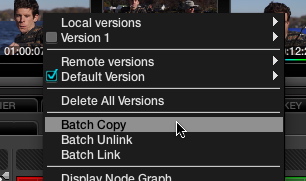
Rt-clicking the Thumbnail Timeline and choosing Batch Copy, it's like having my gravy and drinking it too.
Unlike Batch Unlink, which switches every clip in the session to a blank Local grade (you can switch back to your grades using Batch Link, by the way), Batch Copy copies every clip’s current version to a new Local version, which is now (by definition) unlinked. Every clip has exactly the same grade that it had before, except that now none of them are linked, which means I can start digging into the nitty-gritty of making all the tiny manual adjustments that will make each scene play smoothly.
To summarize—I start my first pass using Resolve’s auto-linked Remote grades, and then I Batch Copy to a new set of Local grades that I can individually tweak without worrying about rippled grades causing problems.
For the last few projects I’ve done, this has worked really well, and it seemed worth sharing.
"3D on the cheap(ish)
I'll preface this post with the disclaimer that this isn't a good way to shoot stereo and I wouldn't shoot anything I was getting paid to deliver with this setup. But I love experimenting and right now I'm looking for ways to independently shoot high quality stereo images that doesn't involve thousands and thousands in equipment rentals, insurance out the wazoo, and all the accompanying personnel to make it go.
More...
Wednesday, June 1, 2011
Canon releases EOS-1D Mk IV / 5D Mark II firmware updates!
Canon has updated the firmware for its EOS-1D Mark IV and EOS 5D Mark II digital cameras. Firmware versions 1.1.0 and 2.0.9 respectively both improve read/write speeds with UDMA 7-compatible CF cards, and also correct minor bugs and menu language errors. Both firmware updates are now available for download (you'll find the links below).
Here is the list of main changes that the firmware updates bring:
EOS-1D Mark IV changes (firmware update version 1.1.0)
- Improves the writing/reading speeds when using UDMA 7-compatible CF cards.
- Fixes a phenomenon that occurs when using high-capacity (32 GB or greater) CF cards: If either a CF card with only a little available space remaining or the battery is removed and then reinserted into the camera, and then the user attempts to start shooting movies immediately, shooting may stop.
- Corrects some mistakes in the menu screens displayed in Arabic and Portuguese.
You can download this firmware here.
EOS 5D Mark II changes (firmware update version 2.0.9)
- Improves the writing/reading speeds when using UDMA 7-compatible CF cards.
- Fixes a phenomenon that occurs when custom function C.Fn III-2 is set to [5: IS start] to assign IS start to the AF stop button on the lens: When used with lenses that do not have an AF stop button, the IS function will not work.
- Corrects some mistakes in the menu screens displayed in Arabic, Portuguese, Spanish, and Thai.
You can get this firmware update here.
"3ality Digital Named Primary Stereoscopic 3D Partner of RED Digital Cinema
ATTO Technology Validates FastFrame FCoE Product Interoperability at FCIA Plugfest
The Visualmakers - Preview/Trailer is Here!
This is the first trailer/preview for The Visualmakers, a documentary filmed at NABShow 2011 that seeks to find out what unites us as independent filmmakers who use the latest breed of relatively affordable digital tools. Find out what unites us all as filmmakers by taking a look at this documentary that goes beyond the gear to the person, in a way you might not have seen before.
The final release of The Visualmakers is scheduled for this summer. After that piece is released, I will post a lessons learned piece as well as a commentary track. Believe me, filming The Visualmakers was as much as a filmmaker story as the piece itself. Enjoy.
Featuring the work and stories of (in order of appearance in this trailer):
Kevin Shahinian
Cristina Valdivieso
Jon Connor
Vincent Laforet
Mick Jones
Julia Swain
Robin Schmidt
Jared Abrams
Ben Eckstein
and
Philip Bloom
"Math behind colorspace conversions, RGB-HSL
In this article I will try to explain the math behind converting RGB values to HSL and back.
RGB is a way to describe a color in a cube, where Red, Green and Blue are on the different axis.
HSL is another way to describe a color. Here we use Hue (the angle on the color wheel), Saturation (the amount of color/chroma) and Lightness (how bright the color is).
More...
OmniTek OTR 1001 is shipping
OmniTek is proud to announce full production shipments of the new OTR 1001. In addition to the waveform, vector and color gamut displays, the OTR 1001 now offers an advanced stereo-3D monitoring and analysis option. This includes a wide range of L/R camera colorimetry-balancing features, plus advanced 3D depth-mapping displays to instantly demonstrate the range of object positions in the source image. These unique displays can immediately demonstrate toe-in geometry problems plus a range of other depth parameters that are essential to monitor in any live 3D production.
"